> For the complete documentation index, see [llms.txt](https://support.referralhero.com/llms.txt). Markdown versions of documentation pages are available by appending `.md` to page URLs; this page is available as [Markdown](https://support.referralhero.com/campaign-builder/integrations/active-campaign.md).
# Active Campaign
ReferralHero allows you to automatically sync your subscribers with an ActiveCampaign list of your choice.
To connect your Active Campaign account:
1. Go to your campaign dashboard > *Edit Campaign > Integrations > ActiveCampaign* and click on **Connect your Active Campaign account**
2. In the popup, enter your **API URL** and **API KEY (**You can find those by going to your Active Campaign account, under *My Settings > Developer)*
3. After you connect your account, choose a list from the drop-down and save the changes.
{% hint style="info" %}
If you create or remove lists in your Active Campaign account and need to update the lists on ReferralHero, just click on the **Update lists** button.
{% endhint %}
### Custom fields
{% hint style="warning" %}
**IMPORTANT**: Custom fields are mandatory and will be added to your ActiveCampaign list automatically.
{% endhint %}
When a person signs up we send a bunch of extra data to ActiveCampaign that is stored in your account's custom fields.(Refer to the [official ActiveCampaign Custom Fields Documentation](https://help.activecampaign.com/hc/en-us/articles/221433307-Custom-fields) for more info).
The Custom Fields we include are:
| CUSTOM FIELD | Description |
| -------------------------- | -------------------------------------------------- |
| **SUB\_ID** | Subscriber's id |
| **FIRST\_NAME** | Subscriber's first name |
| **LAST\_NAME** | Subscriber's last name |
| **PHONE** | Subscriber's phone number |
| **EX\_FIELD** | Subscriber's extra field value |
| **EX\_FIELD\_2** | Subscriber's second extra field value |
| **CODE** | Subscriber's unique referral code |
| **REF\_LINK** | Subscriber's unique referral link |
| **TOT\_REF** | Subscriber's total number of referrals |
| **SOURCE** | Subscriber's source. If empty value will be "None" |
| **REFERRER** | Subscriber's referrer's email address. |
| **FB\_LINK** | Subscriber's unique Facebook referral link |
| **TW\_LINK** | Subscriber's unique Twitter referral link |
| **EM\_LINK** | Subscriber's unique email referral link |
| **LASTREF** | Timestamp of last referral |
| **POSITION** | Subscriber's position |
| **POINTS** | Subscriber’s total accumulated points |
| **ADVOCATE\_CODE** | Subscriber's referrer's referral code |
| **OPTION\_FIELD** | Subscriber's option field value |
| **TERMS\_AND\_CONDITIONS** | Subscriber's T\&C field value |
{% hint style="warning" %}
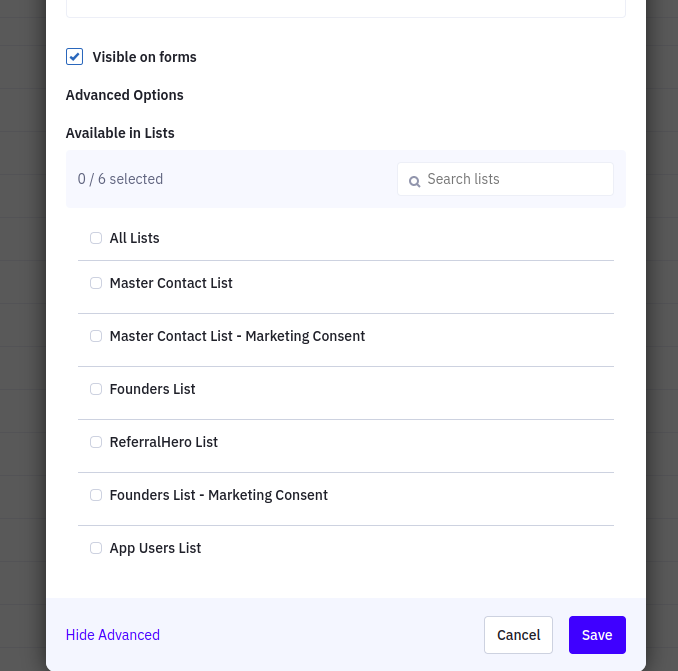
**Important:** Initially, the fields created are hidden by default. You need to make them available for lists under the advanced field options:
{% endhint %}
To manage custom fields:
1. Go to Manage Fields, You will see all custom fields listed
2. Click on the edit icon to open a popup
3. Click on Advanced Options and select the visibility settings
{% hint style="warning" %}
**IMPORTANT**: If you have other custom fields that are required in your list, the sync will fail. Make sure you have NO required custom fields in your list.
{% endhint %}
ReferralHero will automatically update these custom fields when things change (eg: when a subscriber refers a new person, their `TOT_REF` value changes).