> For the complete documentation index, see [llms.txt](https://support.referralhero.com/llms.txt). Markdown versions of documentation pages are available by appending `.md` to page URLs; this page is available as [Markdown](https://support.referralhero.com/campaign-builder/integrations/zapier.md).
# Zapier
The ReferralHero native [Zapier](https://zapier.com/apps/referralhero/integrations) app is a very powerful integration that allows you to connect with 1,500+ third-party apps so that you can send data from one to the other without writing any code. Here is what you can do with a Zap (let us know if you want us to add something else):
**ReferralHero Triggers And Actions**
ReferralHero allows you to send data to a third-party app when the following events occur,
* **New Subscriber**: when a new subscriber is added to your campaign
* **New Referral**: when a new referral is added to your campaign
* **Referral Status Change**: when the referral status is changed from Pending to Unconfirmed/Confirmed
* **Reward Unlocked**: when a specific reward is unlocked by a subscriber
* **Subscriber Deleted**: when a subscriber is deleted
ReferralHero allows you to receive data from a third-party app when the following events occur,
* **Add Points**: add a specified number of points to a subscriber
* **Add Subscriber**: add a new subscriber to your campaign
* **Confirm Referral**: change the referral status from Unconfirmed to Confirmed
* **Track Referral Conversion Event**: change the referral status from Pending to Unconfirmed/Confirmed
* **Track Transaction**: allows you to pass transaction data
* **Update Subscriber**: allows you to update a subscriber
Examples:
In example #1 we'll create a Zapier integration so that every time somebody unlocks a reward in our referral program they are tagged in our ConvertKit account.\
In example #2 we'll create a Zapier integration so that every time a new customer is added to our Stripe account, they are added to ReferralHero.
{% hint style="info" %}
Please notice these are just examples to illustrate how to send data from and to ReferralHero using Zapier.
{% endhint %}
### Example #1: Tag people who win a reward in ConvertKit
**Step 1**: Login or sign-up on [Zapier](https://zapier.com).
**Step 2**: Click on the **Make a Zap!** button in the top-right corner.
**Step 3**: You will now be redirected to the Zapier editor. In the search bar, type "ReferralHero" to find the latest ReferralHero app "ReferralHero (1.2.5)"

{% hint style="info" %}
If you can't find the ReferralHero app in Zapier, [go to this page](https://zapier.com/developer/public-invite/16418/latest/) and add the app to your account.
{% endhint %}
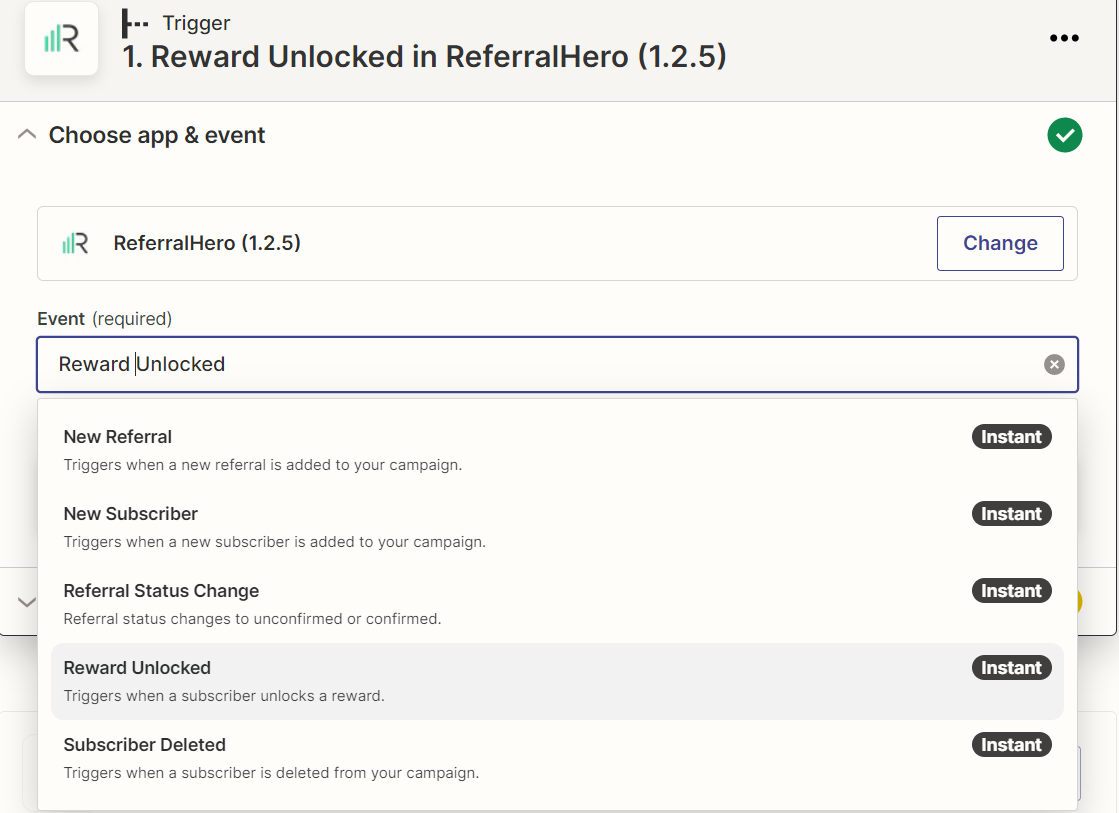
**Step 4**: Choose **Reward Unlocked** as Trigger event from the drop-down menu and click the **Continue** button.
**Step 5**: Connect your ReferralHero account by clicking on the **Sign-in to ReferralHero** button and entering the ReferralHero Zapier API key which you can find in your account *Edit Campaign> Integrations > Zapier.*
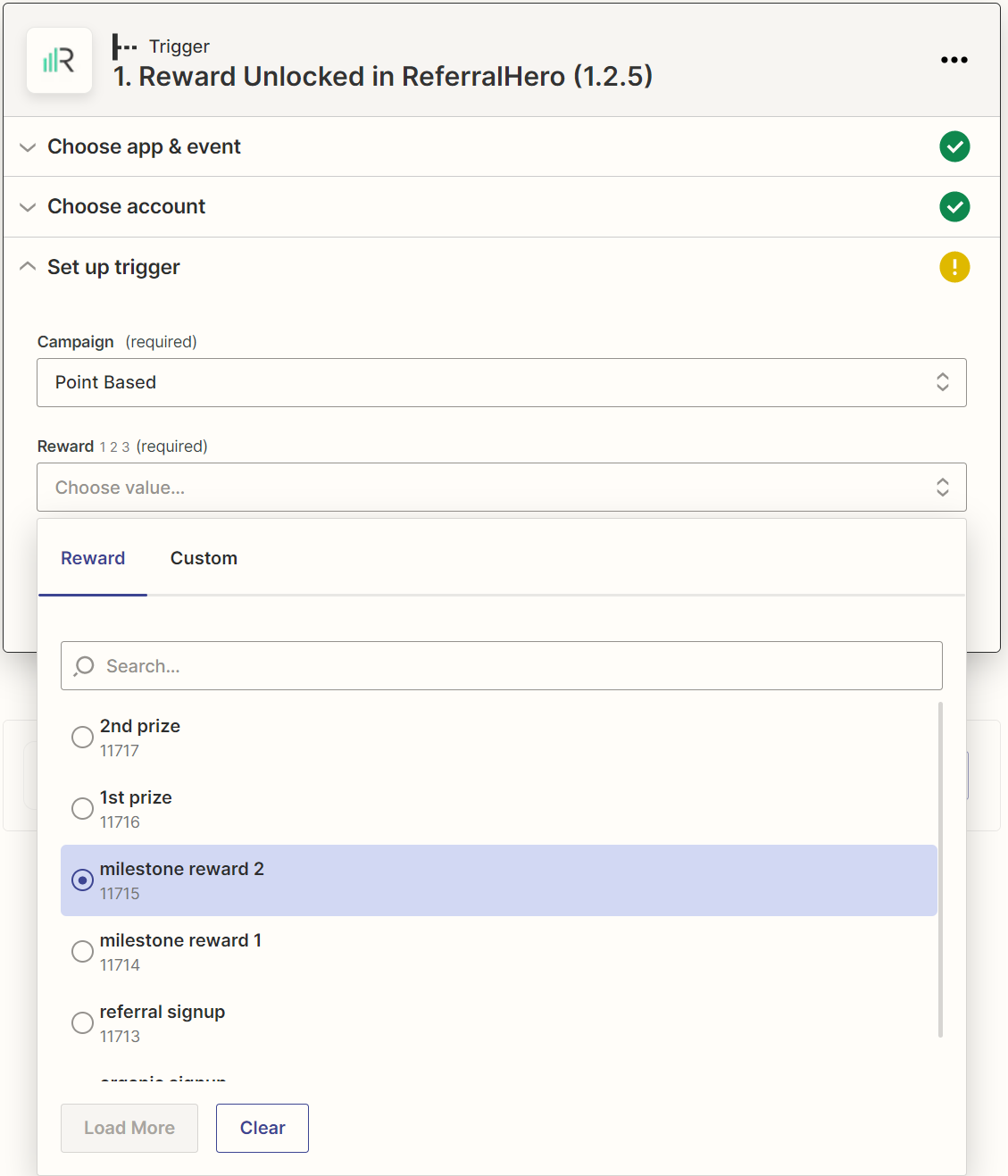
**Step 6**: Choose your ReferralHero Campaign and Reward
**Step 7**: Click the **Continue** button. Then click on **Test Trigger** to import a test event (we'll need this later).
**Step 8**: Click the **Continue** button to finish editing. It's now time to send this data to ConvertKit.

**Step 9**: In the search bar type "convertkit" to find the ConvertKit app.

**Step 10**: Choose **Add Tag to Subscriber** as Action event from the drop-down menu and click the **Continue** button.

**Step 11**: Connect your ConvertKit account by entering the ConvertKit API private and secret key. Click on the **Continue** button.
**Step 12**: In the **Tag** field choose a tag from your ConvertKit account (note: the tag must already exist in your account). In the **Email** field we want to use the email address that we got from ReferralHero. To do so, click the icon to the right of the field. A drop-down will open with the data retrieved with our previous test. Select the **Email** option and click on **Continue** to finish this step.
**Step 13**: If you want to test your integration, click on the **Test Action** button. If the test is successful, you should see a green message.
**Step 14**: Click on **Publish Zap** and turn the Zap on!
### Example #2: Add Stripe customers to ReferralHero
**Step 1**: Login or sign-up on [Zapier](https://zapier.com).
**Step 2**: Click on the **Make a Zap!** button in the top-right corner.
**Step 3**: You will now be redirected to the Zapier editor. In the search bar, type "Stripe" to find the Stripe app.
**Step 4**: Choose **New Customer** as Trigger event from the drop-down menu and click the **Continue** button.

**Step 5**: Connect your Stripe account by clicking on the **Sign-in to Stripe** button.
**Step 6**: Click the **Continue** button. Then click on **Test Trigger** to import a test event (we'll need this later).
**Step 7**: Click the **Continue** button to finish editing. It's now time to send this data to ReferralHero.

**Step 8**: In the search bar, type "ReferralHero" to find the latest ReferralHero app "ReferralHero (1.2.5)".
**Step 9**: Choose **Add Subscriber** as Action event from the drop-down menu and click the **Continue** button.

**Step 10**: Connect your ReferralHero account by clicking on the **Sign-in to ReferralHero** button and entering the ReferralHero Zapier API key which you can find in your account *Edit Campaign> Integrations > Zapier.*
**Step 11**: In the **Campaign** field pick your ReferralHero campaign. In the **Email** field we want to use the email address that we got from Stripe. To do so, click the icon to the right of the field. A drop-down will open with the data retrieved with our previous test. Select the **Email** option. Finally in the **Referral URL** enter the URL that will be used to generate the referral link and click on **Continue** to finish this step.

{% hint style="info" %}
**Note**: campaign, email address and referral URL are required fields but you can send additional data to ReferralHero such as the full name.
{% endhint %}
**Step 12**: If you want to test your integration, click on the **Test Action** button. If the test is successful, you should see a green message.
**Step 13**: Click on **Done Editing** and turn the Zap on!