> For the complete documentation index, see [llms.txt](https://support.referralhero.com/llms.txt). Markdown versions of documentation pages are available by appending `.md` to page URLs; this page is available as [Markdown](https://support.referralhero.com/campaign-management/subscribers/high-risk.md).
# High Risk
ReferralHero is committed to maintaining the integrity of its referral program by preventing fraudulent activities and ensuring that referred subscribers are high quality. This page explains how high-risk subscribers are identified, what happens when they are flagged, and how the approval process affects rewards, automations, and analytics.
## Flagging Flow
Subscribers can be flagged in two ways:
1. **Automatically** – The system runs auto risk checks
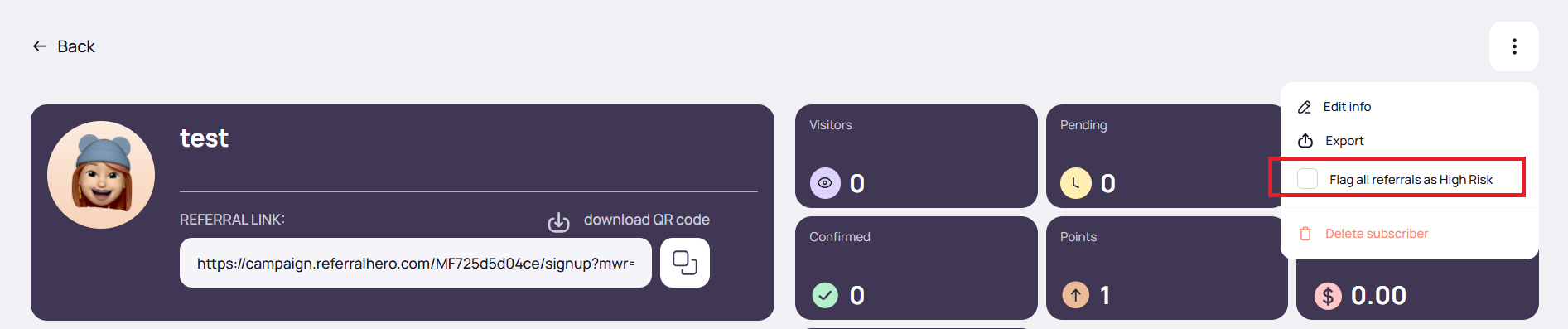
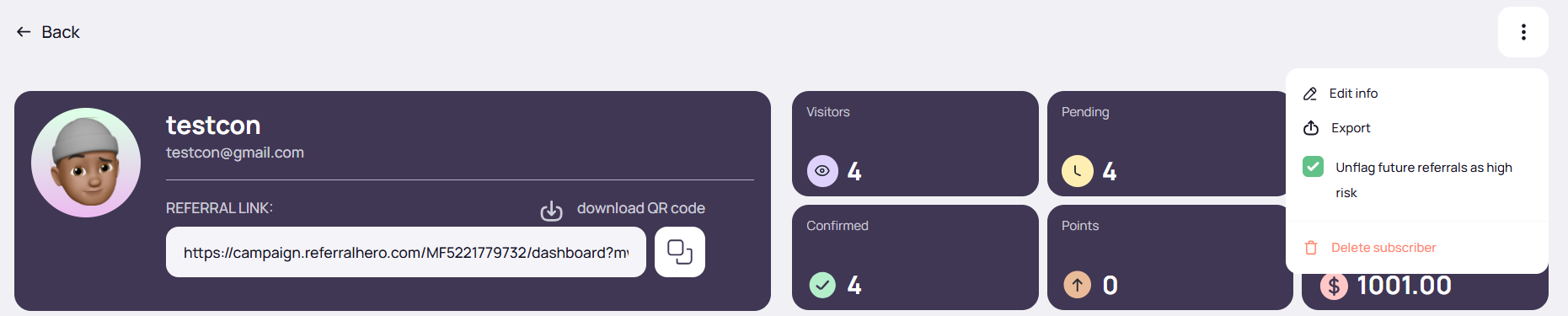
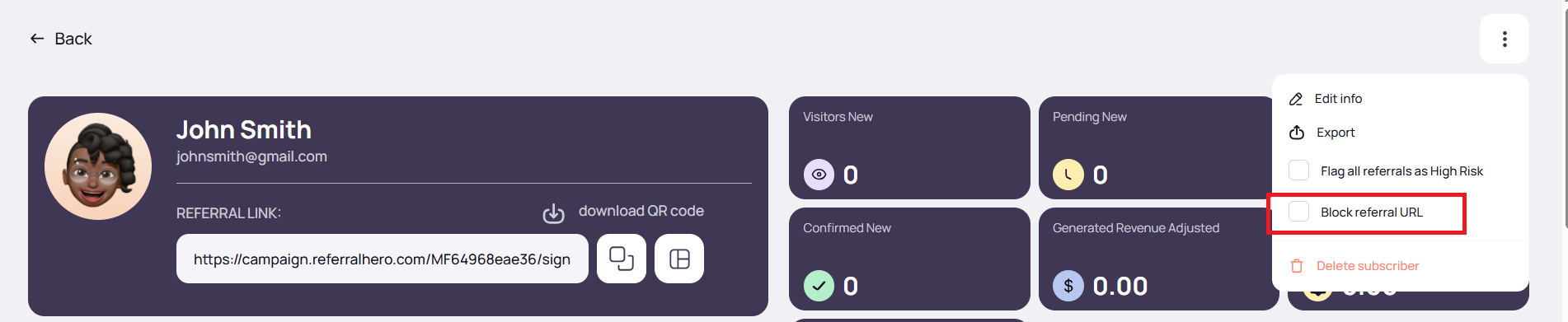
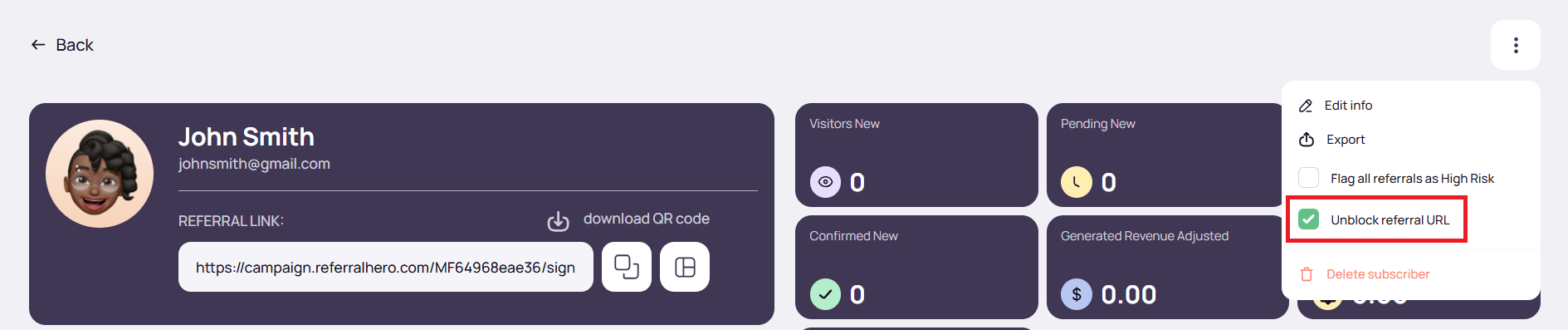
2. **Manually** – Admins can enable **“Flag all referrals as high risk”** from a subscriber profile. To do this, go to the subscriber profile, click the three-dot menu in the top right, and select **“Flag all referrals as high risk”**
### What Happens When a Subscriber Is Marked High Risk
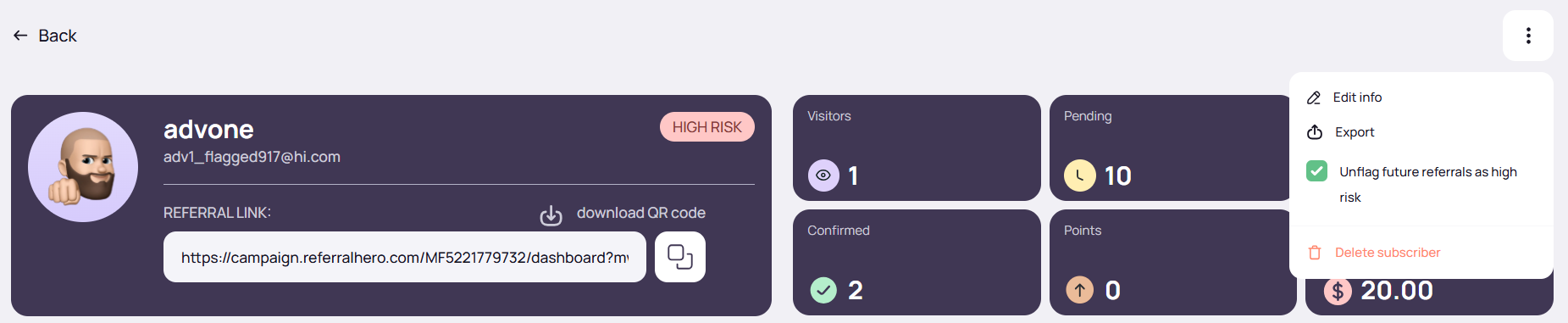
#### **Advocate’s Profile** – the same behavior applies whether flagged automatically or manually:
* Advocate is immediately marked as Risk
* The checkbox **“Flag all referrals as high risk”** becomes active, and its label changes to *“Unflag future referrals as high risk”*
* Referral stats are still counted
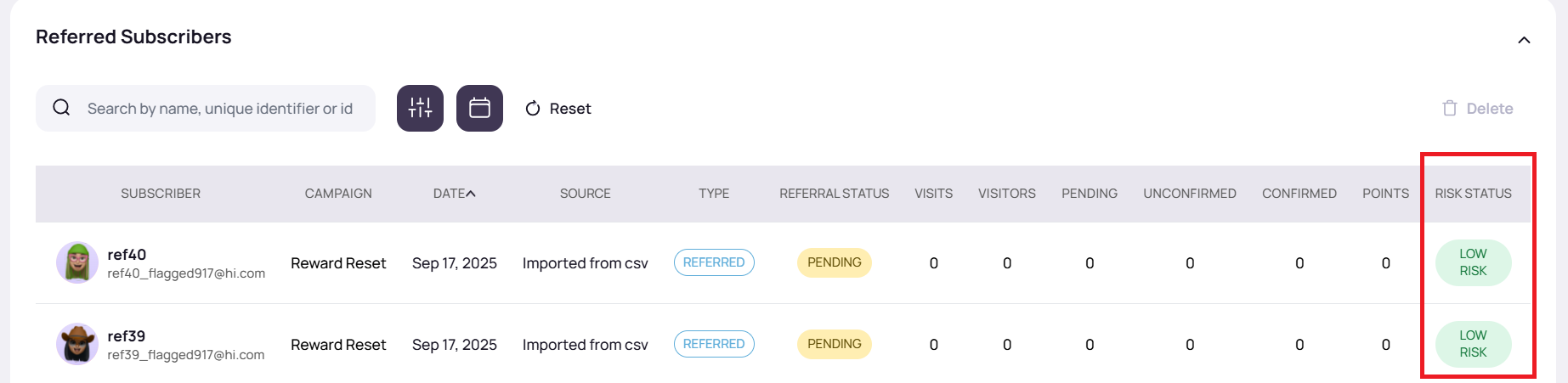
* All existing referrals are flagged as risk
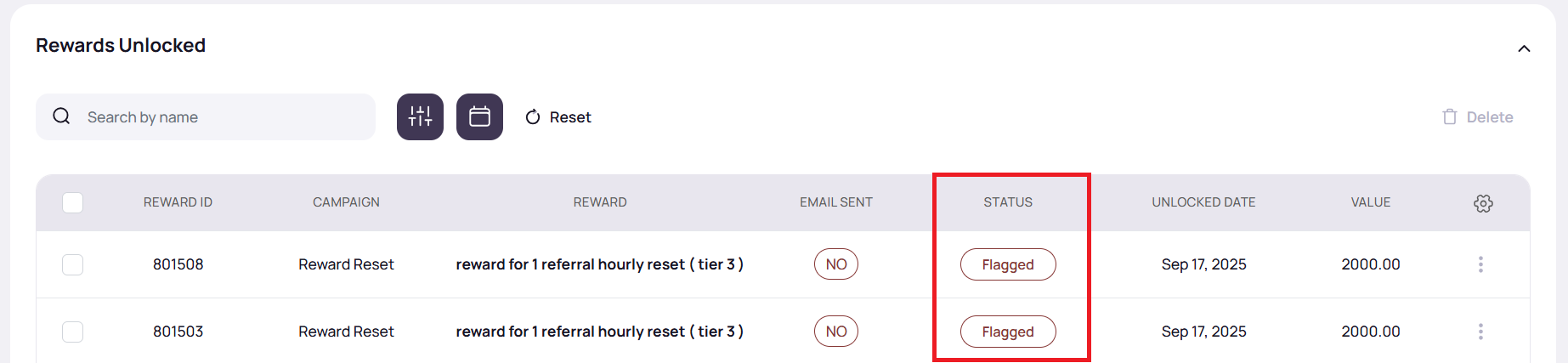
* All pending rewards are updated to *Flagged*
* Timeline log: *“All referrals have been flagged as high risk by admin XXX.”* appears if flagged manually
#### **High Risk Page**
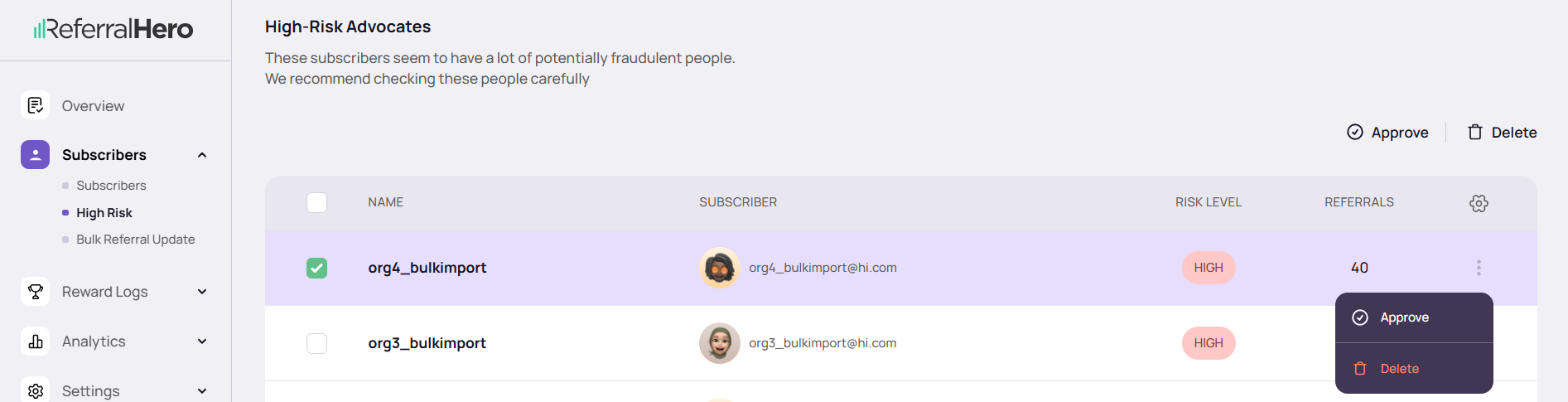
* Advocate appears under *High Risk Advocates*
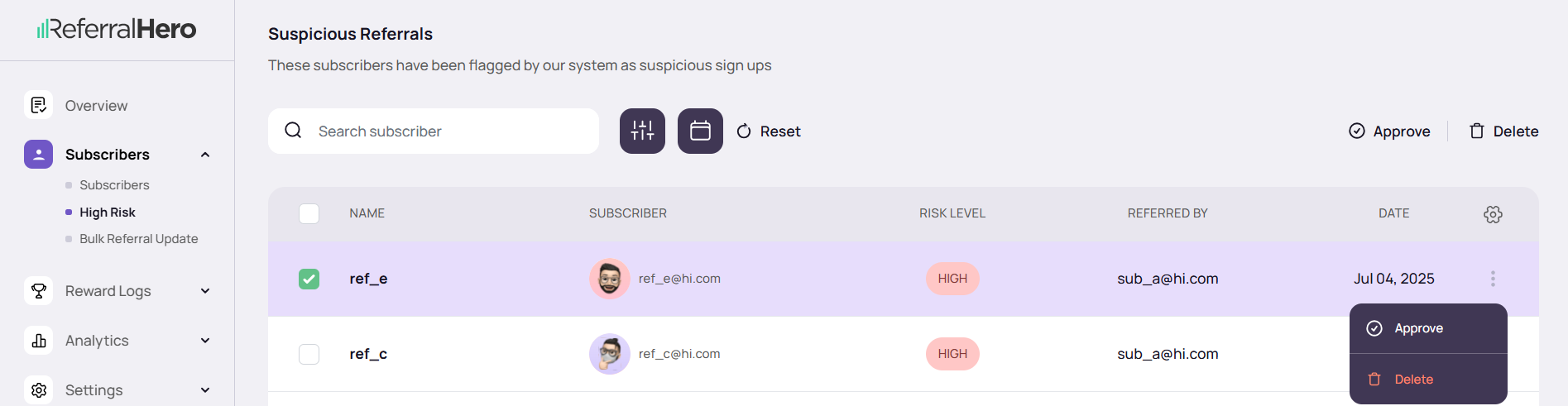
* All existing referrals appear under *Suspicious Referrals*
#### **Future Referrals**
* Automatically flagged as risk
* Appear in *Suspicious Referrals*
* All rewards for the advocate are flagged (regardless of delivery method)
### Approving High-Risk Subscribers and Referrals
#### Approving an Individual Suspicious Referral
1. Go to **Subscribers > High Risk > Suspicious Referrals**
2. Use the **Approve** button at the top to approve multiple referrals at once, or the **Approve** option in the three-dot menu for an individual referral
Once approved:
* Referral is removed from *Suspicious Referrals*
* Referral's risk status is cleared
* Referral’s reward is restored to its original status (*Pending* or *Send immediately*)
* Since advocate's risk status is separate:
* Advocate’s **“Flag all referrals as high risk”** checkbox remains active
* Advocate rewards tied to that referral remain flagged
#### Approving an Advocate
1. Go to **Subscribers > High Risk > High-Risk Advocates**
2. Use the **Approve** button at the top to approve multiple advocates at once, or the **Approve** option in the three-dot menu for an individual advocate
Once approved:
* Advocate and all referrals are cleared of risk status
* The **“Flag all referrals as high risk”** checkbox within their profile is unchecked
* All flagged rewards for both the advocate and their referrals revert to *Pending* or *Send immediately* (depending on delivery method)
* A timeline log is added: *“Advocate approved by admin XXX: All future referrals will no longer be flagged as high risk”*
* Advocate and referrals are removed from *High Risk Advocates* and *Suspicious Referrals*
* Future referrals and rewards behave normally
{% hint style="success" %}
**NOTE:** Approved advocates are not re-flagged by the automatic risk check, even if their actions would normally trigger a flag. They can only be re-flagged manually by an admin.
{% endhint %}
#### Unflagging Future Referrals as High Risk
Admins can manually unflag all future referrals of an advocate without fully approving them:
1. From the subscriber profile, open the three-dot menu in the top right
2. Uncheck **“Unflag future referrals as high risk”**
When unchecked:
* A timeline log is added: *“High-risk flag removed by admin XXX: This change applies only to future referrals, which will no longer be flagged as high risk”*
* No change to the advocate's own risk status
* Existing flagged referrals and rewards remain flagged
* All future referrals are added as normal (not flagged)
* Advocate rewards tied to these future unflagged referrals remain flagged, since they depend on the advocate’s own risk status
* Referral conversion bonuses (if enabled) will unlock as normal and are not flagged for future referrals
#### Re-Flagging a Previously Approved Advocate
* If an admin manually re-flags a previously approved advocate, the advocate’s profile, referrals, and rewards are all re-flagged
* Timeline and UI updates reset to match the initial flagging behavior
* Future referrals and rewards are flagged again
### Flagging for Rewards
#### Individual Rewards
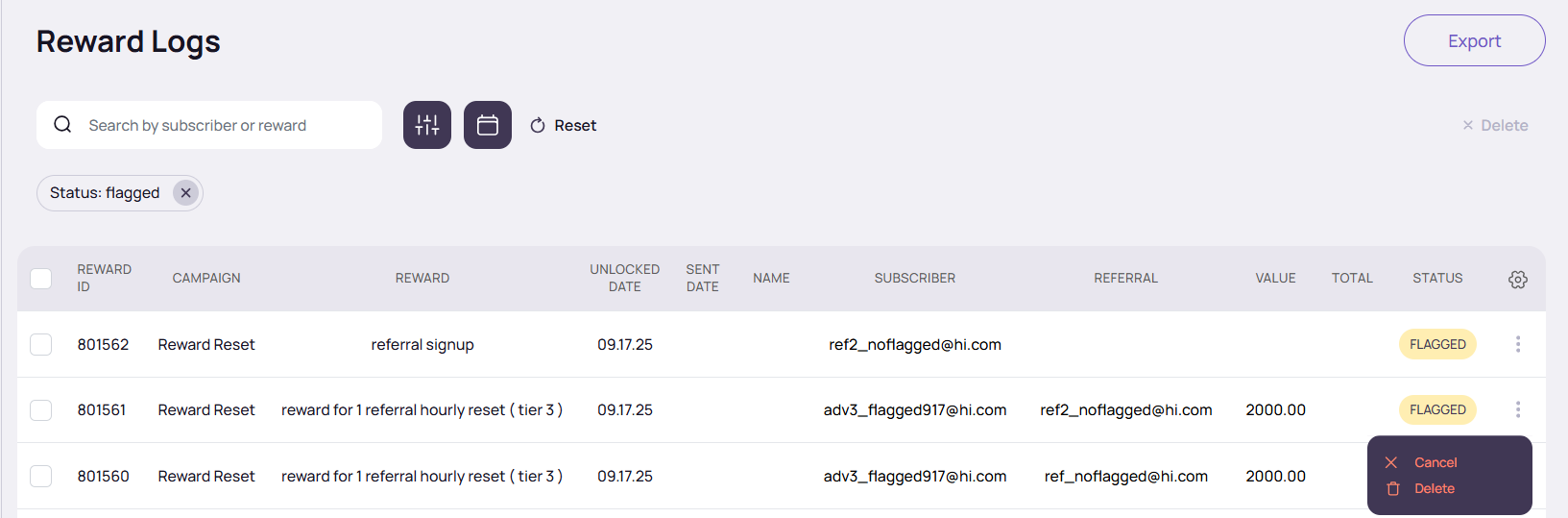
* When rewards are flagged, there is no option to **“Send”**
* Flagged rewards can only be **canceled** or **deleted**
* The **Send** option appears only once rewards are unflagged
#### Group Rewards
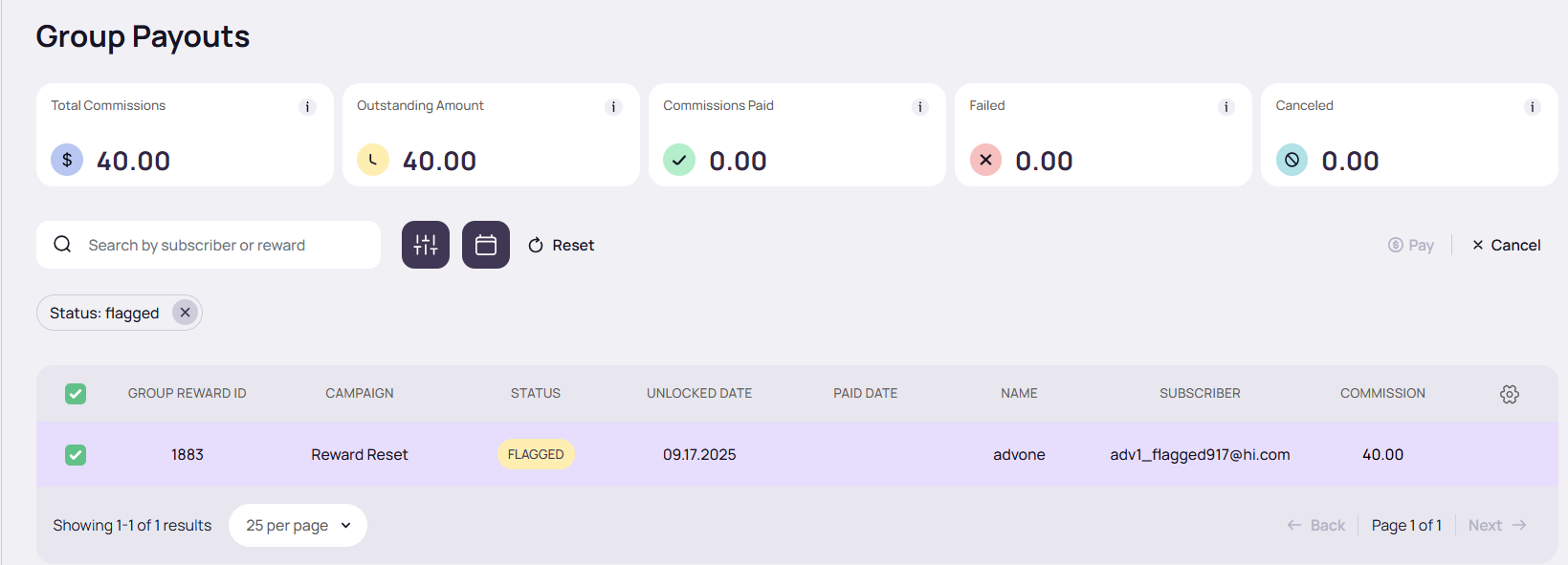
**Group Payouts Main Page**
* If one or more rewards in the group are flagged, the Group Reward status shows as *Flagged*
* There is no option to **“Pay”** when group rewards are flagged
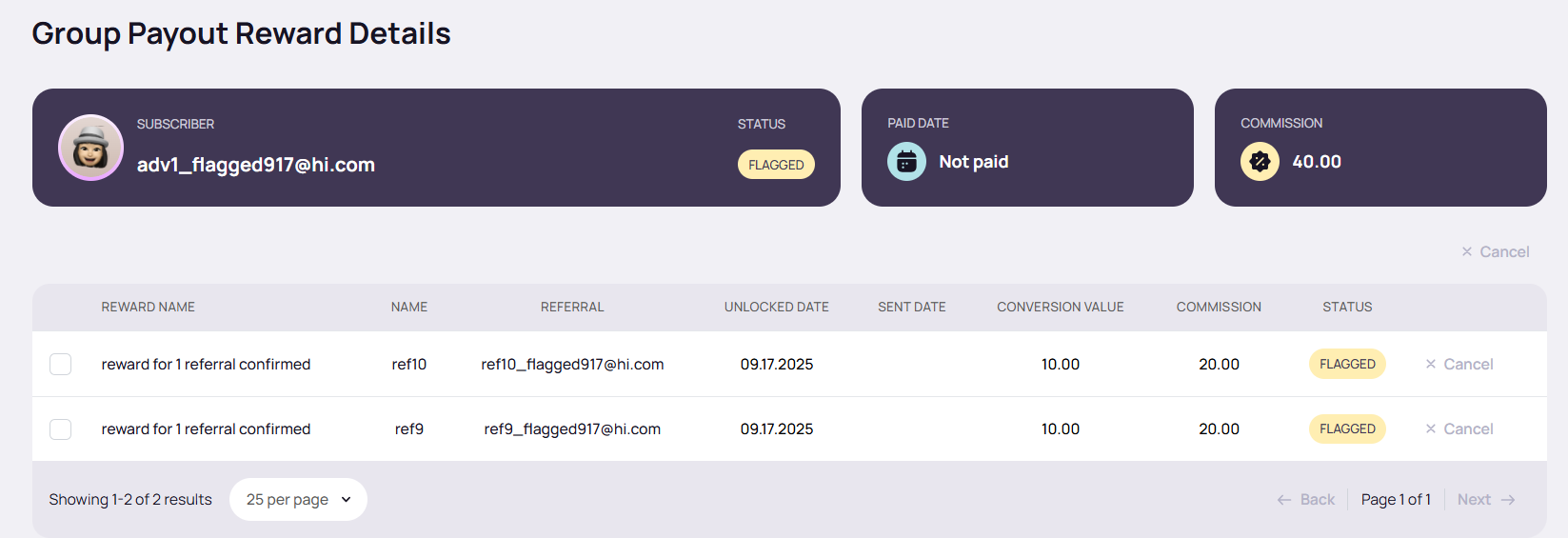
**Group Payout Reward Details Page**
* Flagged individual rewards within the group are displayed with their *Flagged* status. This mirrors what is shown in the individual reward view
* There is no option to **“Pay”** when rewards are flagged
### High Risk Impact
Category
What Happens When Flagged
Rewards
- Rewards earned before flagging (set to unlock immediately) are still sent - All future rewards for the advocate and their referrals are flagged and held
Automations
- Welcome Automations continue - Participation Automations continue - Reward Automations are held, since they only trigger when a reward is actually sent
Analytics / Leaderboards / Positions
Subscribers marked as high risk are still included in analytics, leaderboards, and position rankings
- Advocate marked as Risk - “Flag all referrals as high risk” checkbox = ON - Timeline shows admin action (if flagged manually)
|
- All existing referrals flagged - Future referrals automatically flagged
|
- Pending rewards updated to Flagged - Future rewards flagged and held - Rewards earned before flagging (if immediate) still sent
|
- Welcome + Participation continue - Reward Automations held
| Still counted in all analytics, leaderboard, and position data |
| **Approved** |
- Risk status cleared - “Flag all referrals as high risk” checkbox = OFF - Timeline shows admin approval
|
- All referrals cleared of risk - Future referrals behave normally
|
- All flagged rewards revert to Pending or Send immediately - Future rewards behave normally - Advocate not re-flagged by auto risk check
| - All automations run as normal | Still counted in all analytics, leaderboard, and position data |
| **Re-Flagged** |
- Advocate marked as Risk again - “Flag all referrals as high risk” checkbox = ON - Timeline shows admin action
|
- All referrals re-flagged - Future referrals again auto-flagged
|
- Pending rewards updated back to Flagged - Future rewards flagged and held again
|
- Welcome + Participation continue - Reward Automations held
| Still counted in all analytics, leaderboard, and position data |
### Flagging Logic Across Campaigns and Referral Chains
#### Flagging Behavior Across Campaigns
* When a flagged advocate later joins a new campaign, the flagging mechanism continues to apply
* All future referrals and associated individual and group rewards in the new campaign are flagged
* The advocate appears only once in the High Risk Advocates section, with their referral count reflecting the sum of referrals across all campaigns
#### Flagging Behavior Across Referral Chains
**1. Within the Same Campaign**
**Example:**
* Advocate A refers B → both A and B are auto-flagged.
* A is placed in **High Risk Advocates**.
* B is placed in **Suspicious Referrals**.
* B refers C:
* B’s reward (as advocate of C) is flagged.
* B remains in **Suspicious Referrals**.
* C is **not** flagged.
* C refers D:
* No flagging occurs at this level.
{% hint style="success" %}
**NOTE:** Referrals listed under **Suspicious Referrals** can also be escalated to the **High Risk Advocates** section if they meet auto-flagging criteria.
For example, if **B** (in Suspicious Referrals) refers multiple suspicious referrals, B will remain in **Suspicious Referrals** but will also be placed in **High Risk Advocates.**
{% endhint %}
**2. Across Different Campaigns**
**Example:**
* Advocate A refers B in Campaign One → both A and B are auto-flagged.
* A is placed in **High Risk Advocates**.
* B is placed in **Suspicious Referrals**.
* A then refers C in Campaign Two:
* A’s reward is flagged.
* C is also flagged.
## High-Risk Feature Toggle
You can now completely disable the High-Risk system for your campaign. The new **High-Risk Detection** toggle is located at the top-right of the High Risk page, and it is ON by default.
#### **When the Toggle Is OFF**
Turning the toggle off fully disables high-risk monitoring:
* No new subscribers or referrals will be marked as high risk
* No risk level is applied to any future subscriber
* Existing flagged subscribers remain flagged — their profile and past referrals stay marked
* Existing flagged subscribers' rewards remain flagged, because reward logic follows the subscriber’s own risk status
* New referrals coming from existing flagged advocates are not flagged while the toggle is off
* If referral conversion bonuses are enabled, future referrals unlock bonuses normally (not flagged)
#### **When the Toggle Is Turned Back ON**
Reactivating the feature restores normal automatic risk checking:
* New subscribers and referrals will again be monitored and flagged when suspicious
* Existing flagged subscribers remain flagged unless manually approved
* Rewards resume normal behavior for new activity
This toggle gives you full control over whether the High-Risk system operates in your campaign — useful for debugging, troubleshooting, or when you prefer to manually review referrals.
## Blocking Subscribers
Flagging a subscriber as high risk helps identify and contain suspicious activity, but it does not stop the referral process itself. Referral links remain active, meaning new referrals can still be generated and rewards must continue to be reviewed or manually handled.
Deleting a subscriber removes them from the system, but does not prevent them from re-entering and continuing the same behavior.
Blocking introduces a stronger level of control.
When a subscriber is blocked, their referral URL is fully disabled. This prevents any new referrals, rewards, or payouts from being generated, while preserving the subscriber record for audit and investigation purposes.
#### What Happens When a Subscriber Is Blocked
When a subscriber is blocked:
* Their referral URL is disabled
* No new referrals can be attributed to them
* No new rewards or payouts are generated
* Existing data (referrals, rewards, logs) remains unchanged
* The subscriber record stays in the system for audit purposes
If the subscriber exists in multiple campaigns:
* All of their referral links across all campaigns are disabled
Blocking is designed to fully stop further activity, without losing historical data.
{% hint style="success" %}
**NOTE:** Blocking can be applied independently of flagging status.
{% endhint %}
#### Where to Block a Subscriber
Blocking can be performed from two areas:
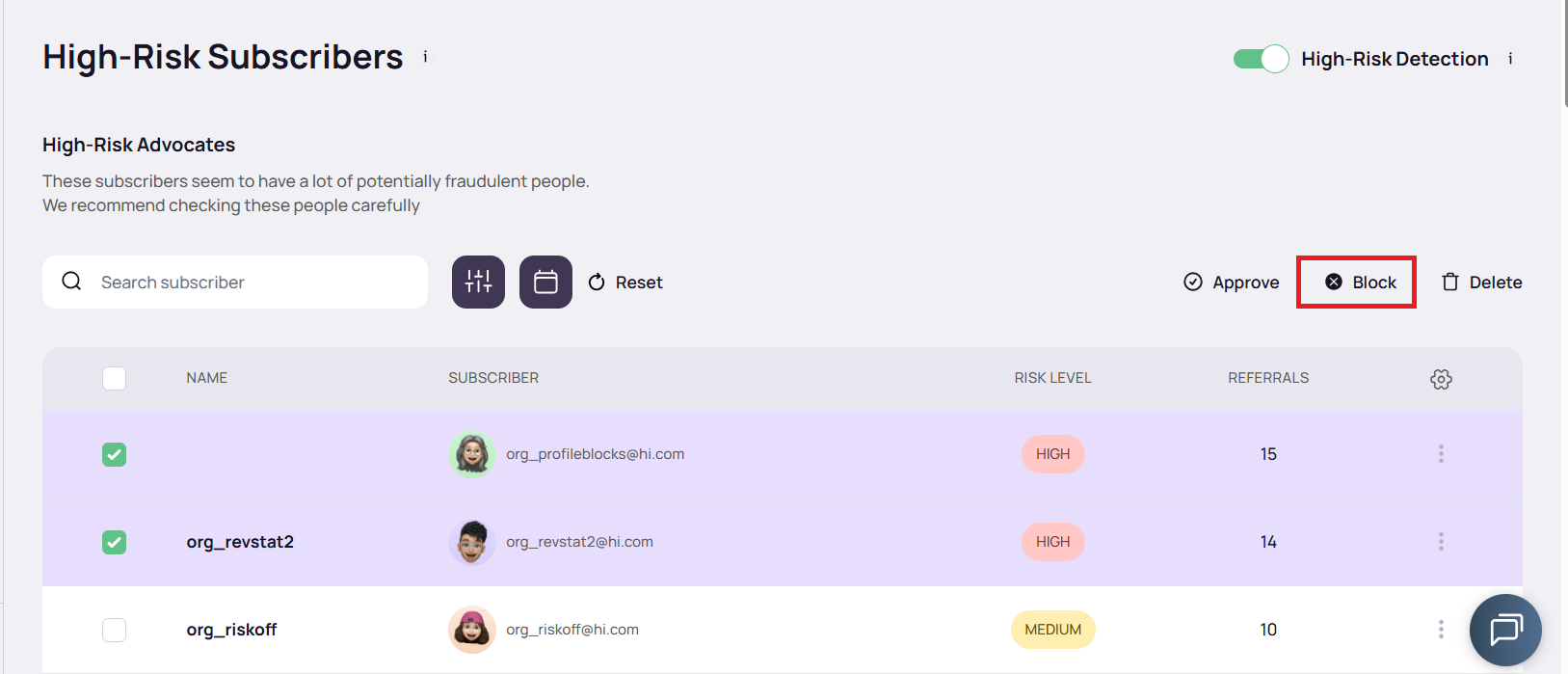
**High Risk Page**
Available in both:
* High-Risk Advocates
* Suspicious Referrals
Actions:
* Use the **Block** button at the top of the page to apply blocking in bulk to selected subscribers
* Use the **Block referral URL** option from the three-dot menu on an individual subscriber row to block a single subscriber
**Subscriber Profile**
* Open the subscriber profile
* Click the three-dot menu in the top right corner
* Select **Block referral URL**
#### Unblocking a Subscriber
Unblocking is only available on an individual basis. There is no bulk unblock option.
To unblock a subscriber:
* From the High Risk page:
* Use the three-dot menu on the subscriber row and select the unblock option
* From the Subscriber profile:
* Click the three-dot menu in the top right corner and select the unblock option
Once unblocked:
* The referral URL becomes active again
* New referrals and rewards can be generated moving forward
#### Blocked vs Flagged
* *Flagged* limits rewards and enables review, but still allows referral activity to continue
* *Blocked* completely stops referral activity by disabling the referral URL
Blocking acts as a stricter enforcement layer when ongoing activity must be stopped immediately
## Common Risk Cases
ReferralHero tracks several recurring patterns that often indicate suspicious or fraudulent activity. These cases don’t automatically mean abuse has occurred, but they act as warning signs that should be investigated before releasing rewards.
**Case 1: Subscriber has referred potentially high-risk referrals**
In this scenario, we explore the prospect that a subscriber has referred individuals displaying characteristics or behaviors associated with high risk. This may encompass patterns of suspicious activity or irregular signup information. ReferralHero actively monitors such cases to safeguard the overall integrity of the referral program.
**Case 2: Subscriber has been referred by someone with a history of suspicious signups**
When a subscriber is referred by an individual with a track record of suspicious signups or fraudulent activities, it raises concerns about the legitimacy of the referral. In this case, ReferralHero's vigilance is essential. We employ advanced tracking mechanisms and analysis tools to identify patterns and correlations, allowing us to assess the risk associated with the referrer.
**Case 3. Subscriber's IP address and device match their referrer's**
Matching IP addresses and devices between the subscriber and their referrer can indicate a potential risk, especially if it suggests artificial attempts to inflate referral numbers. ReferralHero takes this case seriously and employs sophisticated technology to cross-verify such information. By scrutinizing IP addresses and device details, we can identify and address situations where the referral process might be manipulated. This ensures that the referral program remains secure and trustworthy, protecting both the integrity of the system and the rewards for genuine participants.
## Risk Level
Not every flagged subscriber poses the same level of threat. Risk levels provide admins with a framework for deciding how much investigation is needed before making a decision.
**Low Risk**\
Subscribers in this category generally show normal activity with only minor irregularities. Their referral patterns appear natural, and they may have a history of legitimate engagement. These accounts usually don’t require intervention beyond routine monitoring.
*Why it matters:* Low-risk users help remind admins that not every flag is critical — sometimes small anomalies are just noise. Over-policing at this stage could harm program trust, so the safest path is “watch and wait”.
**Medium Risk**\
Medium-risk subscribers display more noticeable irregularities, such as unusual sign-up timing, mismatched details, or clusters of referrals that don’t appear natural. These cases call for manual review, verification steps (like email or phone number confirmation), or a quick check-in with the subscriber.
*Why it matters:* Medium-risk cases often sit in a gray zone. Some turn out legitimate, while others uncover deliberate manipulation. Giving these accounts a closer look helps prevent both unfair penalties and missed fraud.
**High Risk**\
High-risk subscribers show multiple strong signals of abuse — such as repeated suspicious referrals, or a past record of fraudulent attempts. These accounts pose a serious threat to program fairness and rewards integrity. They require immediate and thorough investigation, and in some cases, permanent restriction.
*Why it matters:* High-risk accounts, if left unchecked, can undermine the credibility of the entire referral program. By isolating and holding them until reviewed, ReferralHero protects both the system and legitimate participants.
## Best Practices for Reviewing High-Risk Subscribers
When dealing with flagged subscribers, admins should follow a consistent review process to separate legitimate advocates from abusers.
1. **Review details carefully** – Check names, email formats, signup timestamps, and referral patterns. Legitimate referrals tend to look natural, while fraudulent ones often reveal shortcuts (e.g., disposable emails, repeated usernames)\
*Why:* A careful scan can catch the majority of abuse without needing heavy investigation
2. **Add verification steps** – If something feels suspicious, add additional forms of verification to the campaign, such as confirming an email, phone verification, or even a quick check-in with the subscriber\
*Why:* Fraudsters rarely respond to verification, while real participants usually comply quickly
3. **Decide between approving or keeping flagged** – Only approve when you’re confident the activity is genuine. Leaving someone flagged doesn’t harm analytics but ensures rewards stay on hold until clarity is reached\
*Why:* Erring on the side of caution protects both rewards and trust
4. **Avoid deleting subscribers** – Deletion removes valuable historical data that might later help identify patterns. Unless you’re certain an account is malicious and unwanted, it’s safer to leave it flagged rather than erase it\
*Why:* Keeping records makes long-term fraud detection more accurate
5. **Document actions taken** – Log what you reviewed, why you approved or rejected, and any verification steps\
*Why:* Documentation builds consistency across admins and provides backup if disputes arise
## General Guidelines
Beyond case-by-case reviews, admins should keep broader principles in mind to maintain program integrity:
1. **Communicate transparently with participants** – When possible, clarify issues with subscribers directly. Many false positives can be cleared up with a simple explanation\
*Why:* Open communication maintains trust and prevents frustration among legitimate users
2. **Keep thorough records** – Save investigation notes and flagged history\
*Why:* Having a reliable paper trail ensures decisions are defensible and helps future admins handle similar cases more consistently
3. **Escalate when necessary** – If a case continues to look suspicious after initial review, involve higher-level admins\
*Why:* Some fraud patterns only become clear at scale. Escalation ensures tough cases are reviewed with the right expertise